Pro Git
A revisitation of a good book.
I made a couple naïve attempts at trying to master git circa 2024.
After obtaining the UGrad, I have had a couple months of unemployment to improve my Software Engineering skills.
As such I read more than a small selection of this book and produced the following flashcards1:
"Deep Work: Professional activity performed in a state of distraction-free concentration that pushes your cognitive capabilities to their limit." —Cal Newport
Notes
Flashcards
Is it true that git add is a multi-purpose command? if so, what are some things it can do?
True. it can track new files, stage files, and mark merge-conflicted files as resolved.
it may also be able to do more things.
What is the checksumming algorithm used by Git? What is the length of the values? What are the value strings composed of?
SHA1 hash. 40 length. Hex; i.e. 0-9 + a-f
What are the three main states files can reside in?
- Modified (changed in your working directory)
- Staged (in the index, ready for commit)
- Committed (saved in the repository / HEAD history)
What does the staging area look like?
it is a file called index.
What are the three scopes of git config and where are each of the configuration files stored?
--system| all users:/etc/gitconfig--global| current user; all repos:~/.gitconfigor~/.config/git/config--local=|.git/configper repo control
Does /etc/gitconfig trump .git/config?
No. local trumps global which trumps system. This is also the case for configuration files more generally.
What command can you use to check the git configuration settings? What about a specific key?
git config --list
git config <key> ; where key can be something such as user.name or user.email, core.editor, etc.
What are the two types of files from gits' perspective? What kind of files belong in each type?
-
tracked: things previously staged; newly staged files.
- can be modified, unmodified or staged
- untracked: everything else. the stuff git doesn't know about.
How to git add recursively?
trick question; git add automatically adds directories recursively.
What does git add do?
it begins tracking the file and stages it for committing. it is multi-purpose and can do even more. think of it as "add precisely this content to the next commit"
How to get a short git status? what do the LHS columns mean here?
$ git status -s
M README
MM Rakefile
A lib/git.rb
M lib/simplegit.rb
?? LICENSE.txt
Back
git status --short or -s.
m: modifiedmm: modified, staged, modifieda: added to staging??: untracked
What files do *.[oa] and *.~ ignore in the .gitignore?
files ending with .o OR .a and files ending with .~.
How do you write comments in .gitignore file? how do you specify a directory to ignore?
#
end the directory name with /
note, unless you add the prefix slash, it will ignore that named directory at all levels! the prefix slash means 'not recursively'
What are glob patterns?
Front
What do these ones do?
*[abc]?[0-9]a/**/z
Back
they are simplified regular expressions.
*: matches zero or more characters.[abc]: matches any character inside the brackets?: a single character[0-9]: matches any character between the rangea/**/z: nested directories; matchesa/b/c/z,a/z,a/b/z, etc.
What do the following instructions do in a .gitignore file?
*.a!lib.a/TODObuild/doc/*.txtdoc/**/*.pdf
Back
- ignore all
*.afiles - but track
lib.a - only ignore
TODOfile in current directory. notsubdir/TODO. recall that prefix/avoids recursivity - ignore all files in any directory named
build - ignore
doc/notes.txt, but notdoc/server/notes.txt - ignore all
.pdffiles indoc/and subdirs
Can a repo only have 1 .gitignore file?
no, it can have one in each subdirectory if required.
What does git diff do?
it compares what is in your working directory with what is in your staging area.
How can you use git diff to compare your staged changes to the last commit?
git diff --staged
What is the difference between git diff --staged and git diff --cached? What do they do?
they're synonyms!
shows the diff between last commit and what is staged
What does -v do in git commit?
adds a git diff to the commit popup so you can see exactly what you are committing.
How can you skip the staging area? What is there to be careful of?
git commit -a -m "<message>"
this will only commit the files that were already being tracked. no new files.
How do you remove a file from git? precisely what does the command for this do?
you must remove the file from the tracked files (staging area) and then commit.
git rm does this and also deletes the file from the working directory (so it's not "unstaged" later)
When should you do the -f option for git rm?
if you modified the file or added it to the staging area.
it's a safety feature to prevent removal of files that aren't in a snapshot.
How to remove a file from staging area, but keep it in working directory?
git rm --cached <file>
What order does git log show commits in?
reverse chronological order – most recent commits first.
What does git log -p -2 do?
shows only last 2 commits with diff (or patch) details
What do git log --stat and git log --pretty do? what values can pretty take?
--stat prints a list of modified files below each entry. how many such files, and how many lines were changed.
--pretty has options: oneline, short, full, fuller, format: _, etc.
What does git log -n do where n is integral? How can you get commits made in the last 2 weeks?
shows last 2 commits.
git log --since=2.weeks
also, --until is useful too.
dates can be "2008-01-15" or even relative: "2 years 1 day 3 minutes ago"
What git log flag is commonly referred to as the pick axe? What does this pickaxe do?
git log -S<needle> (the “pickaxe”) shows commits where the number of occurrences of <needle> changes (added/removed).
(Note: git log -s just suppresses diff output.)
How can you filter in git log based on path? where in the command should this filter go?
at the very end, separated by -- to segregate from the other options: git log -- path/to/file
What flag allows you to declutter the log history from merge commits when using git log?
--no-merges
How can you fix a commit message / add an extra file to your commit (that hasn't been pushed yet)?
Use git commit --amend.
- To fix the message only:
git commit --amend -m "new message"(or run without-mto edit in your editor) - To add a forgotten file:
git add <file>thengit commit --amend --no-edit
Amending rewrites the last commit: it creates a new commit with a new hash (the old commit becomes unreachable unless referenced). Avoid amending if the commit has already been pushed/shared (or you’ll need a force push).
What does git checkout -- <file> do? Are there perils?
Back
It discards working-tree changes to <file> by replacing it with the version from the index (staging area).
How it behaves:
- If file is staged: restores the staged version
- If file is not staged: restores from
HEAD(because index matchesHEAD)
Perils:
- Permanently loses uncommitted local edits in your working directory
- No safety net—changes are gone forever
- Does not create a commit or backup
Safer modern equivalents:
git restore <file>(restore working tree from index)git restore --source=HEAD <file>(explicitly restore from last commit)git restore --staged <file>(unstage without discarding working changes)
Note: git checkout -- is deprecated in favour of git restore
What's the difference between git restore <file> and git restore --staged <file>?
Back
git restore <file>
- Discards working directory changes
- Restores file from the index (staging area)
- Leaves staging area unchanged
- Use when: you want to undo edits but keep staged changes
git restore --staged <file>
- Unstages the file (removes from index)
- Leaves working directory unchanged
- Your edits remain in the working tree
- Use when: you staged something by mistake but want to keep your changes
Common workflow:
# Made changes and staged them
git add file.txt

# Oops, didn't mean to stage yet
git restore --staged file.txt  # unstage, keep changes

# Actually, don't want these changes at all
git restore file.txt  # discard working changes
Key insight: One affects staging area, one affects working directory
If you've staged changes to a file, what does git checkout -- <file> restore: the staged version or the HEAD version?
Back
The staged version (from the index).
Example scenario:
# Original file has "A"
echo "B" > file.txt
git add file.txt          # Index now has "B"

echo "C" > file.txt       # Working tree now has "C"

git checkout -- file.txt  # Restores "B" (staged version)
                          # NOT "A" (HEAD version)
Key point: git checkout -- <file> always restores from the index, not directly from HEAD.
To restore from HEAD instead:
git checkout HEAD -- <file>git restore --source=HEAD <file>
This is why it's important to know what's in your staging area!
Which 2 commands does git restore (with different flags) replace?
Back
git restore <file> replaces:
git checkout -- <file>(discard working directory changes)
git restore --staged <file> replaces:
git reset HEAD <file>(unstage file)
Why the change:
Git introduced git restore and git switch to split the overloaded functionality of git checkout into clearer, more focused commands.
Mnemonic:
- No flag = restore working tree
--stagedflag = restore (remove from) staging area
What's the modern replacement for git reset HEAD <file> (unstaging)?
Back
git restore --staged <file>
Why the change:
- More explicit and clear intent
git resetis overloaded (moves HEAD, unstages, discards changes depending on flags)git restore --stagedonly does one thing: unstage
Shorthand equivalents:
git reset <file> (HEAD is default) = git reset HEAD <file>
But both are now discouraged in favour of git restore --staged.
What is the command to add a new remote with shortname and URL?
git remote add <shortname> <url>
What does git fetch <remote> do?
it just downloads the data from whichever remote is the argument, and places it in the .git folder. no merging occurs.
What does git reset HEAD <file> do?
It resets the file in the index to match HEAD (unstages it) while leaving the working directory version unchanged.
How to see the URLs of all the remotes? What about a single remote?
git remote -v
OR for more info on a single remote: git remote show origin
How can you list tags? How can you (optionally filter them)?
git tag
with optional -l that respects globs -l ""
What are the 2 types of tags? What do they do?
lightweight: pointer to a specific commit
annotated: full objects. checksummed; contain metadata: tagger name, email, date, message.
How do you push tags? how can you delete them?
git push <remote> <tagname>
or for lots: git push <remote> --tags
delete: git tag -d <tagname> (which does so locally) followed by git push <remote> --delete <tagname>
How can you create an annotated tag with message?
git tag -a <tagname> -m ""
How can you tag an old commit?
git tag -a <tagname> <commit_hash>
How do you see tag data?
git show <tagname>
When is rebasing a bad idea?
when other people have based work on your commits.
do not rebase those.
How can you rebase server branch onto master without checking out server first?
git rebase master server
"replay the commits onto master from server branch"
What does git rebase master do? Assuming you're on the experiment branch?
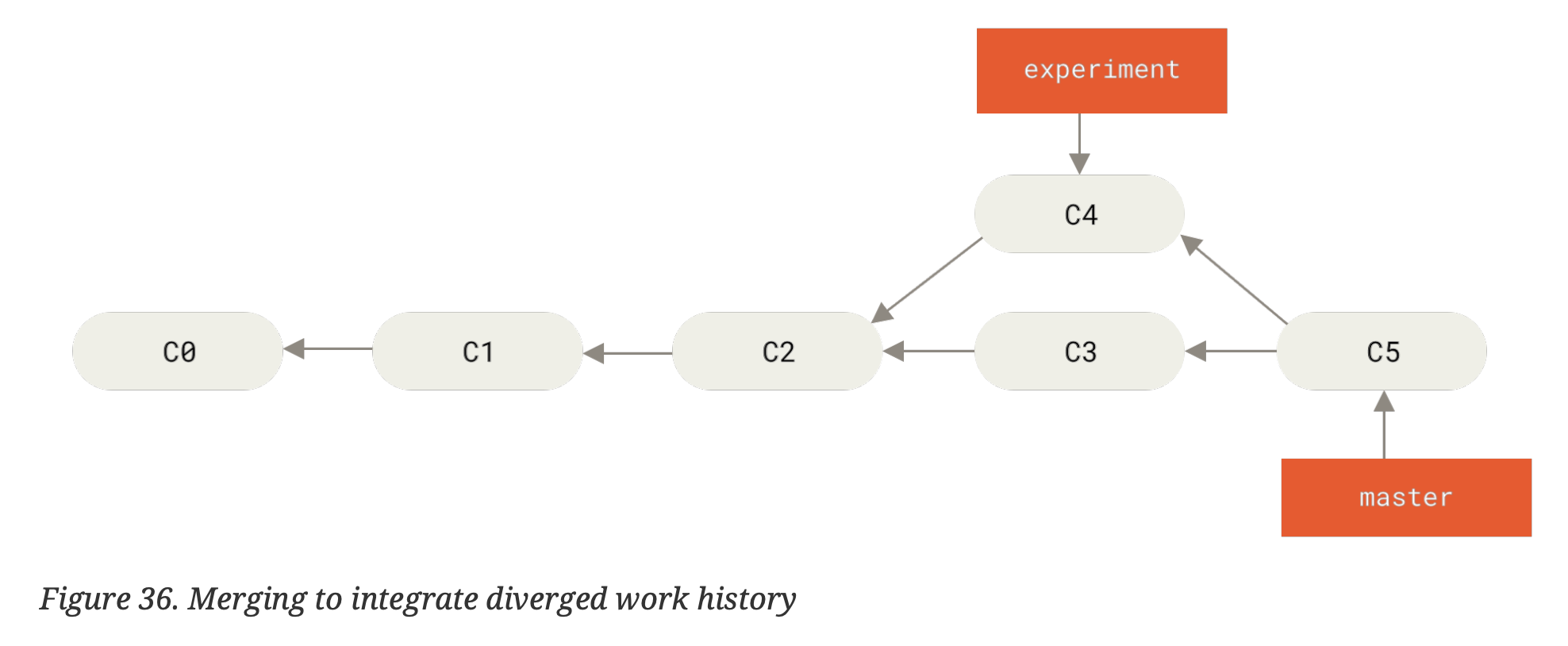
Back
goes to common ancestor; gets diff of every commit – saves them into a temp file; resets experiment branch to same commit as master. applies each patch.
you will then need to fast-forward by checking out master and merging experiment into it.
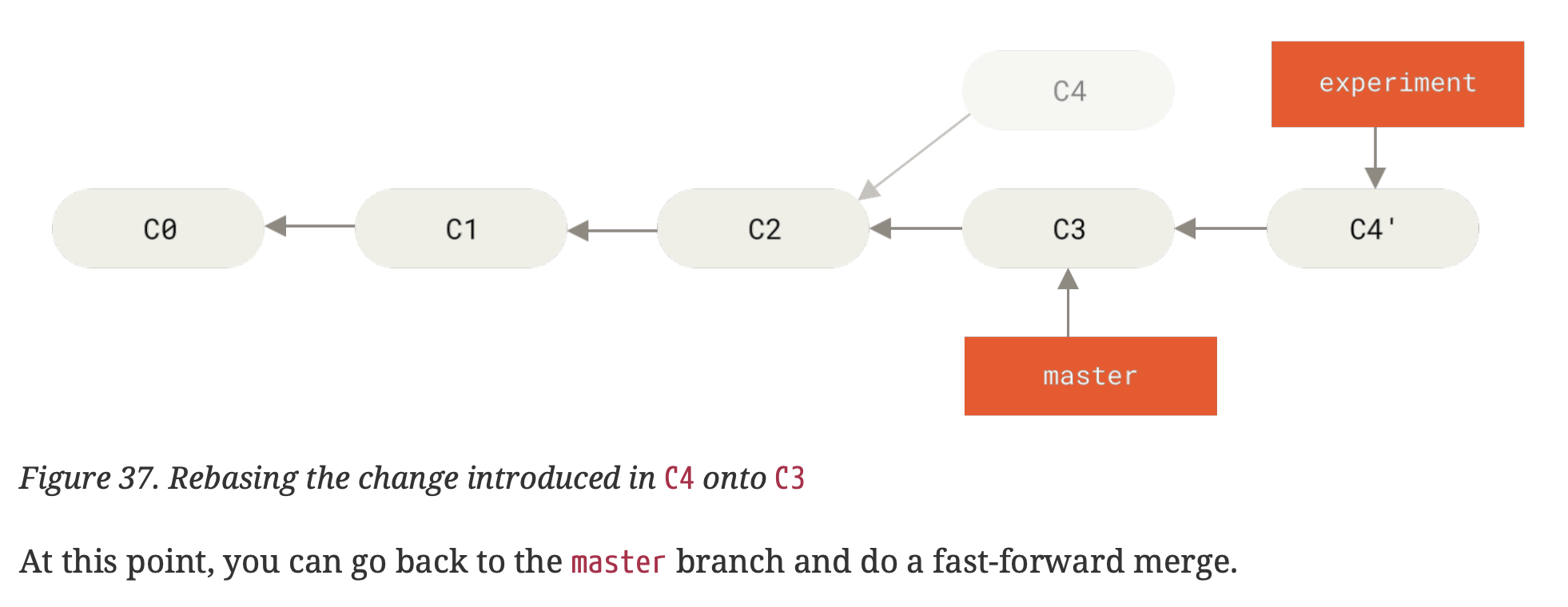

What are the commands for a basic rebase? How are they different to a merge?
rebase:
git checkout experiment
git rebase master
"go to experiment branch, apply patches to master"
merge:
git checkout master
git merge experiment
"merge changes into current branch"
What does rebasing do?
takes all the changes committed on one branch and replays them on another branch
What is a small gotcha vis-a-vis the git branch -vv command and the information it returns?
it's telling you information about what we have cached from the last fetch. we are better off running git fetch --all; git branch -vv
What does the -vv flag do to git branch?
shows what tracking branches have been set-up.
lists out local branches with more information; what each branch is tracking and if the local branch is ahead, behind or both.
What is @{u} short for? What is an alternative short-form for this? What does git merge @{u} do?
short for the upstream url. hence @{upstream} is another short-form.
git merge @{u} merges the current branches' upstream into the current branch.
If you already have a local branch and want to set it to a remote branch you just pulled down, or want to change the upstream branch you're tracking, the command is {{c1:: git branch -u origin/<branch>}}
What is git checkout serverfix an alias for, where you don't have the remote serverfix branch?
git checkout --track origin/serverfix which itself is shorthand for git checkout -b serverfix origin/serverfix
When you git fetch from a remote (git fetch origin), does that give you editable copies of the new branches?
no, only unmodifiable pointers.
you need to run git merge origin/<branch> which pulls in the changes into your current branch. to make a new branch, use git checkout -b serverfix origin/serverfix
How to push a branch up to a particular remote?
git push -u <remote> <branch>
This pushes the local branch to the given remote and sets its upstream,
so that later you can just run git push on that branch.
Creating a branch does not automatically push it; you must push it at least once as above.
How do you download changes from a remote repository without merging them?
git fetch <remote>
How can we get a full list of remote references?
git ls-remote <remote>
OR
git remote show <remote>
How do you rename a branch? Are there perils?
git branch -m <old> <new> (rename branch locally)
git push -u origin <new> (push new branch name + set upstream)
git push origin --delete <old> (delete old branch from the remote)
Perils: if others are using the old branch name (locally or tracking
origin/<old>), renaming/deleting it will break their setup until they
rename or re-point their branches.
What does git branch --no-merged master do?
shows you which branches have not been merged into master. You can give the final argument to see info on a branch you don't have checked out.
What do the --merged and --no-merged options do on git branch?
shows you which branches are already merged into the branch you're on.
--no-merged shows the branches that have work that you have not merged in.
What happens when you run git branch with no arguments? What about if you add -v?
naked is a simple listing.
 git branch
  iss53
,* master
  testing
note that * tells you what is currently checked out! (i.e. where the HEAD points)
-v also shows the last commit on each branch:
$ git branch -v
  iss53 93b412c Fix javascript issue
,* master 7a98805 Merge branch 'iss53'
  testing 782fd34 Add scott to the author list in the readme
How can you solve merge-conflicts?
edit the files and choose the correct code.
git add and git commit (staging the file marks it as resolved). you could also use git mergetool
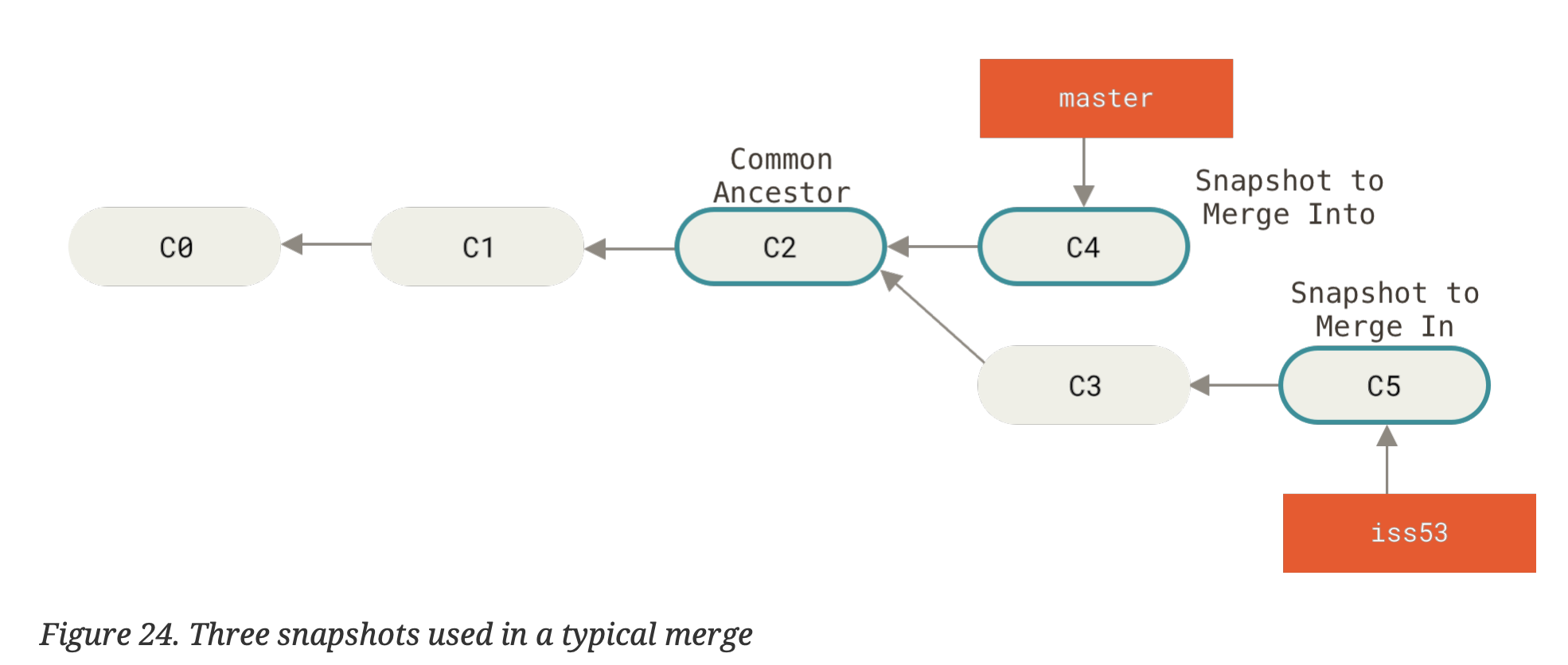
What happens when you do a git merge and the commit of the branch you're on is not a direct ancestor of the branch you're merging in?
simple three-way merge. uses the two snapshots pointed to by the branch tips and the common ancestor of the two.
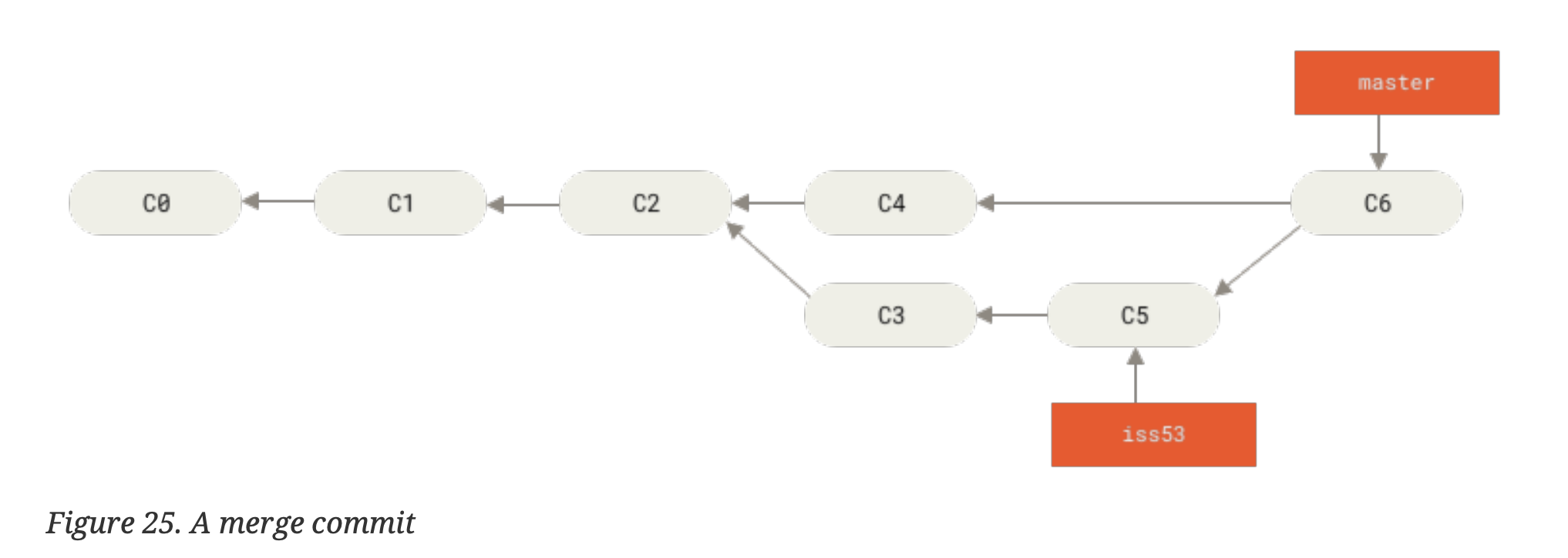
How to merge hotfix branch into main?
git checkout main
git merge hotfix
note if you can fast-forward then you should delete the hotfix branch after merging: git branch -d hotfix
What is "fast-forward"?
When the merge has no divergent work to merge together it just moves the branch pointer forward
How can you create a new branch and switch to it in the same command?
git checkout -b <new_branch_name>
alternatively you can now use git switch with --create / -c for a new branch.
note git switch - changes to the last branch.
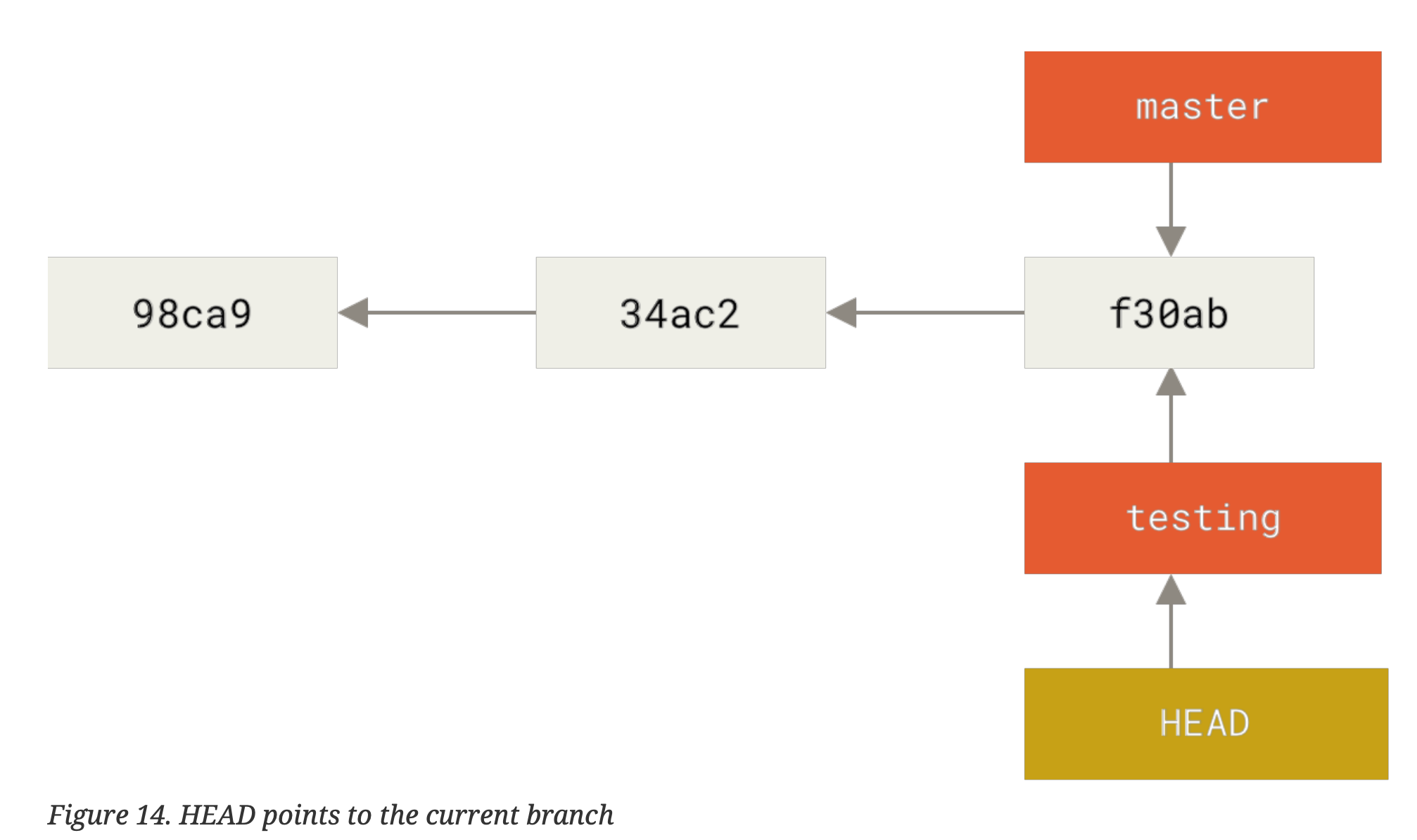
Is it expensive to create and delete branches? Explain.
No, the pointers are just simple text files with the 40 character SHA1-hash checksums of the commit it points to.
41 bytes cost (+ newline)
Which branches does git log show branches for? How can you modify this behaviour?
git log <branch_name> shows logs for an arbitrary branch git log --all shows for all branches but by default, it's whatever HEAD is pointing to.
What is the command to switch an existing branch? How can you create a new branch?
git checkout <branch_name>
git branch <branch_name>
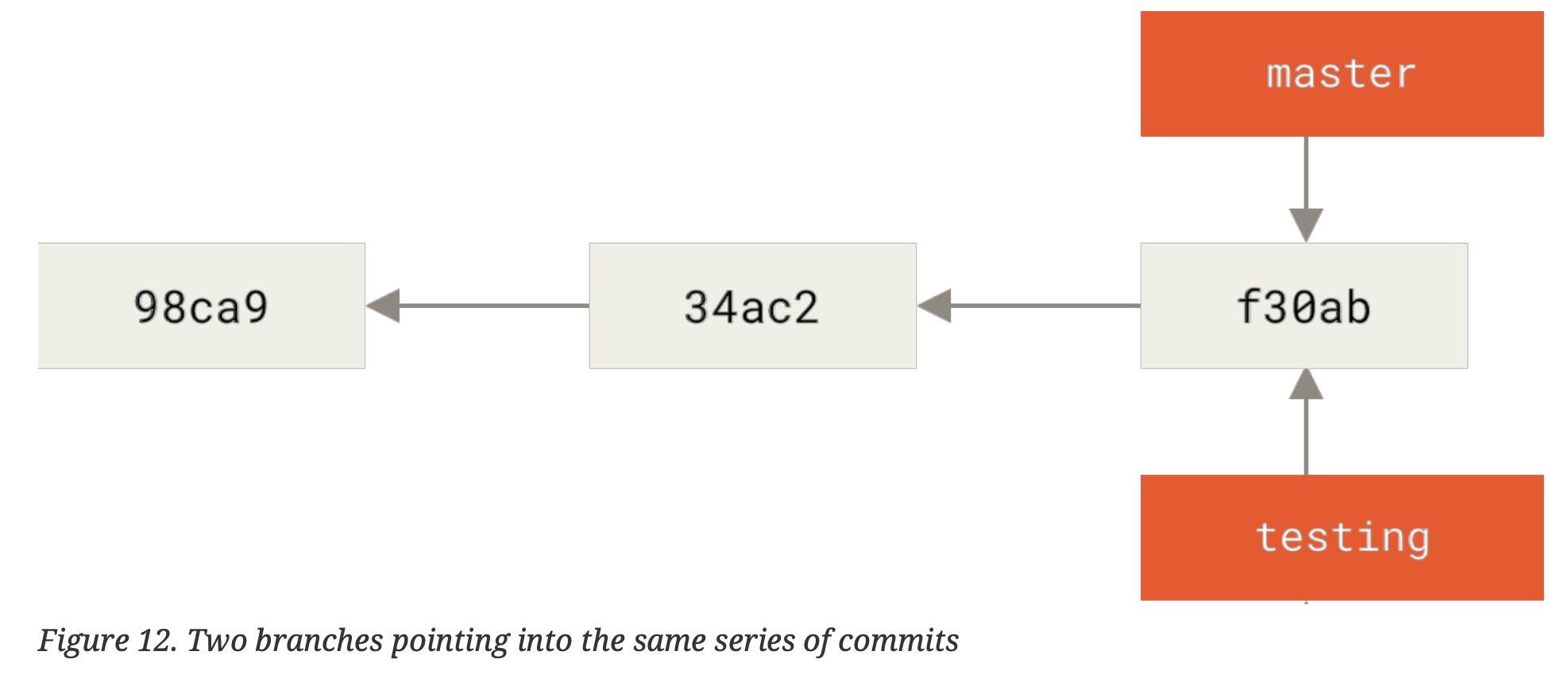
What command can we use to see where the branch pointers are pointing? i.e. HEAD
git log --oneline --decorate
Modern note: --decorate is now on by default in most Git versions

How does Git know what branch you're on?
Keeps a special pointer called HEAD that is a pointer to the local branch
How many pointers are in a commit object?
- 0 for the initial commit (no parents)
- 1 for regular commits
- multiple (2?) for merge commits
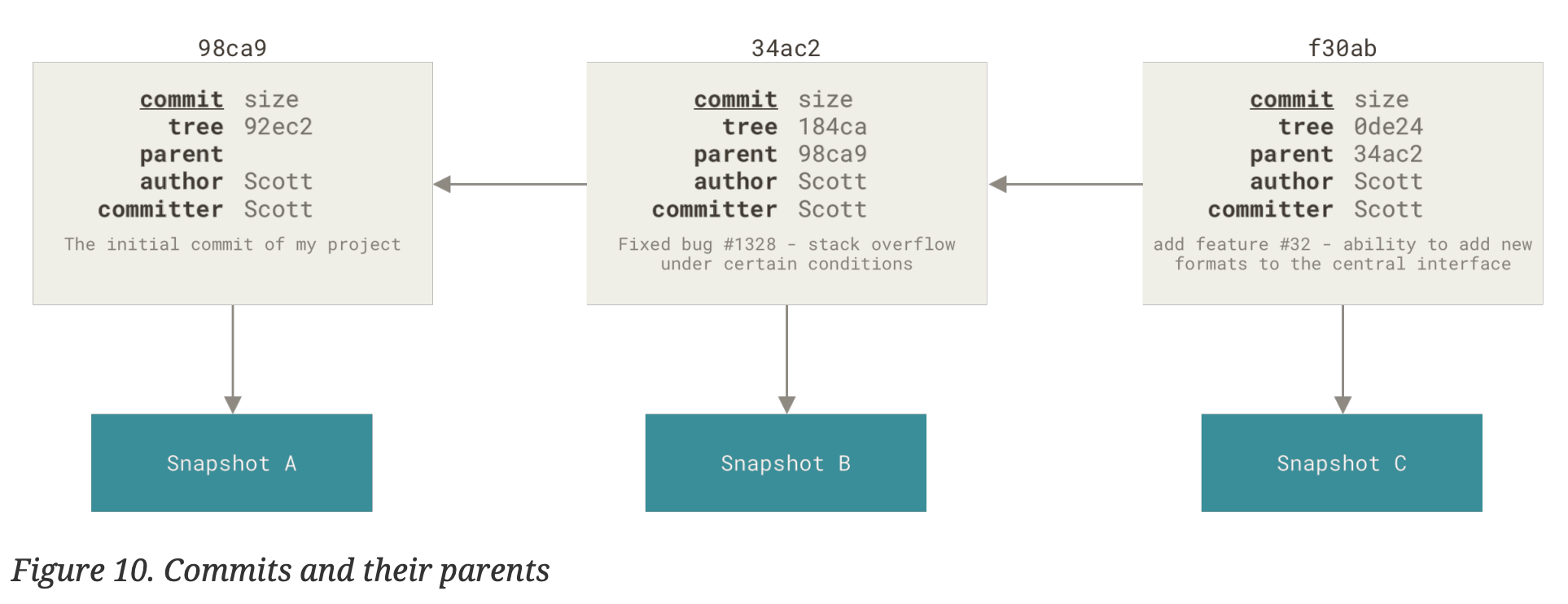
What happens when you make a commit? What does Git store?
stores a commit object with a pointer to the snapshot. also contains metadata + pointer/s to directly previous commits.
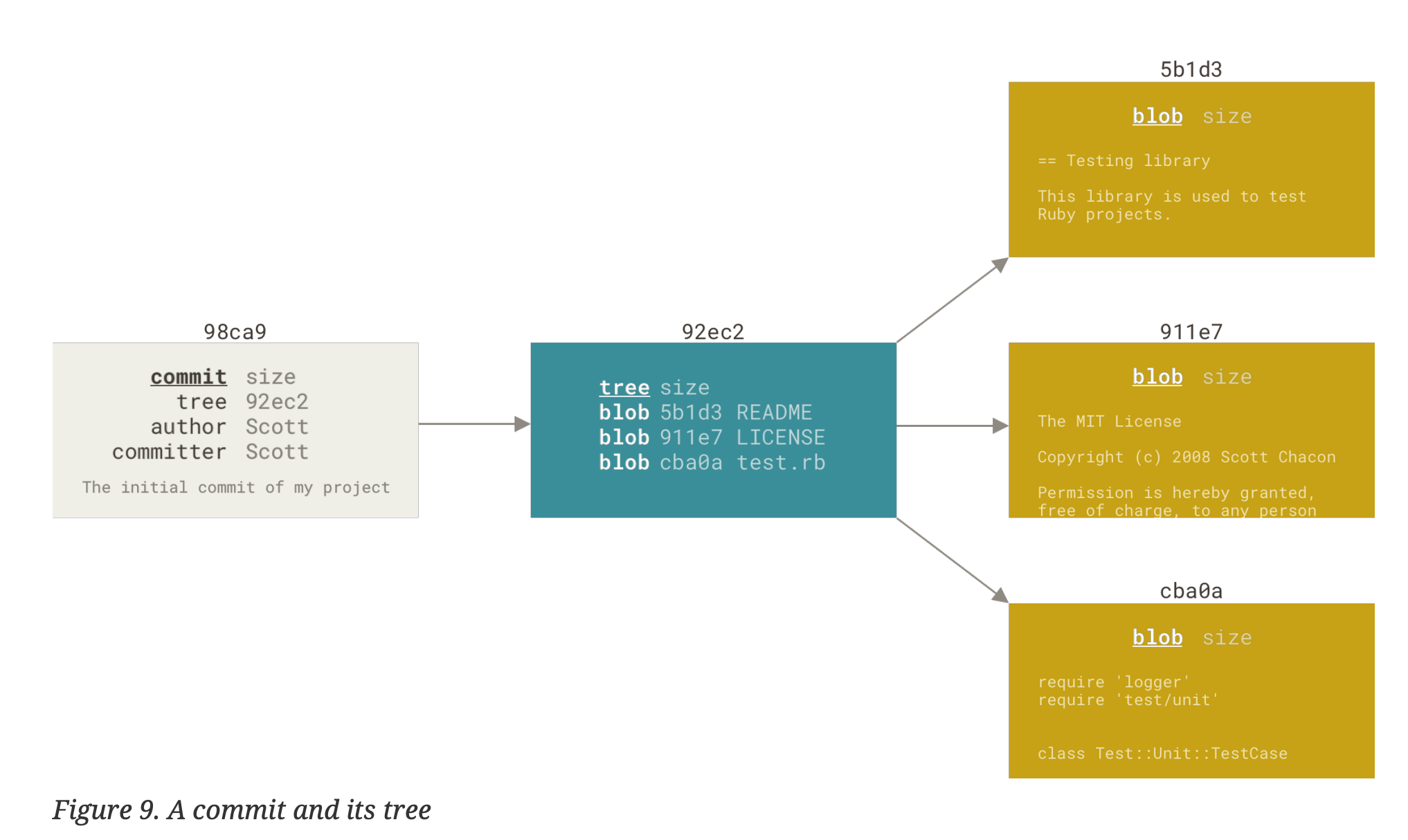
A branch in Git is simply a lightweight, movable {{c1::pointer}} to a commit.
When does a file get a checksum? What does this imply has happened?
when the file is staged.
implies a version of the file has been stored. (called blobs)
Why should you write git commit messages in the imperative form? What does imperative form mean?
Write "Fix bug", not "Fixes bug" or "Fixed bug".
The convention matches with commit messages generated by commands like git merge and git revert.
How can you condense git commit -a -m ""? Is this true for all flags?
Yes: you can combine short flags, so:
git commit -am "msg"
is the same as:
git commit -a -m "msg"
But no, this is not true for all flags. Only single-letter short options can be grouped like this, and only when they don’t require their own attached value.
Examples:
- OK:
-am(equivalent to-a -m;-mtakes its message as the next argument) - NOT like this: you generally can’t combine long options (e.g.
--amend) or assume every short flag combination is valid.
What does the three-dots syntax do? git log --no-merges issue54...origin/master
The three-dots range A...B is the symmetric difference between the two branches.
git log --no-merges issue54...origin/master
shows commits that are reachable from either issue54 or origin/master,
but not from both — i.e. commits that are unique to one side or the other.
(You can add --left-right to see which side each commit comes from.)
What is the -u flag short for? git push -u origin featureB:featureBee
-u is short for --set-upstream.
In:
git push -u origin featureB:featureBee
originis the remote.-
featureB:featureBeeuses the<src>:<dst>syntax:featureBis the local branch.featureBeeis the remote branch name onorigin.
The -u / --set-upstream flag makes the local branch featureB
track origin/featureBee, so later you can just run git push or
git pull with no extra arguments.
What does git merge --squash featureB do?
It takes all the changes introduced by branch featureB (since the merge-base with your current branch) and applies them to your working tree/index as one combined change, without creating a merge commit and without recording the branch history.
After running it:
- the changes are staged (like a big “combined” diff)
- you still need to run
git committo create the single squashed commit - it does not mark
featureBas “merged” in Git history (a later normal merge may try to reapply commits).
What does git am do?
"_a_pplies a series of patches from a _m_ailbox"
reads on mbox file, but can also accept a .patch file.
What does git log --pretty =fuller -1 do?
shows last commit with fuller formatting.
What does the --not option do here:
git log <branch> --not master
Back
excludes commits on the master branch.
synonymous to git log master...branch
What option can pass to git log to get the diff introduced by each commit?
-p
How to do a diff between the last commit of the branch you're on and its common ancestor with another branch?
On your feature branch, to see what this branch has introduced since it forked from master:
git diff master...
This uses the three-dots syntax:
- In general,
git diff A...Bmeans: diff betweenmerge-base(A, B)andB(changes on B since the common ancestor). - So
git diff master...(orgit diff master...HEAD) shows commits that are on your current branch but not onmaster, ignoring changes that onlymasterhas.
(You can also write git diff master...branch if you want to compare explicitly to branch.)
How to explicitly find the common ancestor of two branches contrib and master?
git merge-base contrib master
What is cherry-picking? What does the usage look like?
it is like a rebase, but for a single commit.
git cherry-pick <commit_hash>
(cherry picks that commit into current branch)
What does git describe <branch> do?
Gives a human-readable string to describe a commit.
What does git shortlog --no-merges master --not v1.0.1 do?
gives a short log of all the changes since the last release of v1.0.1
How to clone a repository? How to specify a path to clone into?
git clone <remote> <optional_path>
What is a bare repository? How can you create one?
a Git repository with no working directory.
git clone --bare <source>
git init --bare <directory>.git
the .git part is convention for bare repositories.
What does ssh-keygen do? What does adding the -o flag do?
Generates a public and (corresponding) private key.
-o saves the private key in a format more resistant to brute-force attacks. (use this option if setting a password)
What are some pros and cons of setting up Git on your own webserver?
pros:
- lots of control
- run everything from within your own firewall
- some organisations might not allow code on another server
cons:
- time to set-up
- maintainence efforts
What are the 4 distinct protocols Git can use to transfer data?
local, http, secure shell (ssh), git.
How do you check the open issues in a repository with gh?
gh issue list --state open
How do you see the descriptions of a particular Github issue using gh?
gh issue view <num>
Is Github a part of Git?
No, it is a Git host. A place where some functionalities become simpler.
How does Github map commits to your user?
by email address
Do forks exist as part of Git or Github? How about pull-requests?
Forks and pull requests are not core Git features; they are hosting-platform features (e.g., GitHub/GitLab/Bitbucket).
In Git itself, you only have repositories and remotes; a “fork” is just another repo you can add as a remote, and a “pull request” is a workflow built on Git commits/branches plus platform review + merge tooling.
Is it true that often pull requests are created at the beginning of a project? If so, why?
True. Because you can keep pushing to the topic branch even after the pull request is opened.
How can you update a pull request with new code?
Commit to the topic branch and push. The pull request gets updated automatically.
How can you solve "Pull request does not merge cleanly"?

Back
two main options:
- rebase your branch on top of whatever the target branch is
- you can merge the target branch into your branch (preferred)
In Github, all issues and pull requests are assigned {{c1::numbers}} and they are {{c1::unique}} within the project
How can you reference issues/pull requests from comments? What are the three syntaxes?
Text
How can you reference issues/pull requests from comments? What are the three syntaxes?
- {{c1::same scope (i.e. same fork):}} {{c4::=#<num>=}}
- {{c2::another fork:}} {{c3::=username#<num>=}}
- {{c6::different repo:}} {{c5::=username/repo#<num>=}}
Back Extra
What happens at the bottom of an issue or pull request if someone links to it with the #<num> syntax?
Github create a 'trackback' event
In addition to linking to issue numbers in Github, you can also reference a specific {{c1::commit}} by the {{c1::full 40 character SHA-1 hash}}.
What is a really cool aspect of the checkbox syntax in Github flavoured markdown?
- [X] write the code
- [ ] write all the tests
Back
simply clicking the checkbox updates the comment – there is no need to manually edit the file!
How can task lists be used in Issues and Pull requests on pages that list these out?
A little icon with their progress appears beside the headings.
How to write emojis in Github?
I :eyes: that :bug: and I :cold_sweat:.
:trophy: for :microscope: it.
:+1: and :sparkles: on this :ship:, it's :fire::poop:!
:clap::tada::panda_face:
Pull requests can either come from a {{c1::branch}} in a {{c1::fork}} of your repository or they can come from {{c1::another branch in the same repository}}.
How can you pull and merge changes from someone's fork without adding it as a remote?
Back
git pull <URL> <branch>
Example:
git pull https://github.com/username/repo patch-1
When to use this:
- One-off contributions you want to test/merge
- Don't want to permanently add their fork as a remote
- Quick way to fetch and merge someone else's branch
Compare to normal workflow:
# Normal way (if you'll collaborate repeatedly):
git remote add contributor <URL>
git pull contributor patch-1

# One-off way:
git pull <URL> patch-1
Technically speaking, what does this do?
$ curl https://github.com/tonychacon/fade/pull/1.patch | git amBack
merges in the pull request.
Is ls-remote a plumbing command or porcelain command? What happens if you run it on a repository?
plumbing.
gives a list of all the branches and tags and other references in the repo.
What does the CONTRIBUTING file do on Github?
It shows contributors the rendered version of the file when they start opening a pull request.
What is this an example of?

What kind of entities have this functionality in Github?
Back
Audit log.
Github organisations.
What are the 2 main systems for scripting Github?
- Hooks and Services
- API
What are the rate limits to Github when authenticated vs. when not?
5,000 vs. 60.
Is Curl + HTTP requests the best way to interface with the Github API?
There is never a "best way", but other languages like Go, .NET, Objective-C and Ruby do have more idomatic frameworks for the API.
What to do when you do a git init followed by a git add -A of many large files?
git rm -r --cached (unstages everything)
git gc --prune=now (deletes blobs)
What does git blame do?
for each line in a file, it shows the last commit that modified it: who made the change, when, and which commit it was.
e.g. git blame path/to/file.py
What does the syntax git show commit:file do?
It shows the contents of file as it was in commit (or any commit-ish),
without changing your working tree or HEAD.
e.g. git show HEAD~2:src/main.py prints how src/main.py looked two commits ago.
What is the minimum number of characters required to (uniquely) refer to a SHA-1 Hash?
What is the other requirement?
Back
4 chars minimum; uniqueness
What is the difference between git log --oneline and git log --abbrev-commit --pretty=oneline?
They are the same.
Note though, that git log --pretty=oneline does not abbreviate the commits.
What does git rev-parse topic1 do?
Where rev-parse is a plumbing command, and topic1 is a branch (pointer)
Back
Shows the SHA-1 hash of the commit that the branch is pointing to.
Does a freshly cloned repo have a reflog? What does reflog stand for?
Nope – it only records the current users actions.
"Reference log" – a log of where the HEAD and branch references have been (for the last few months)
How to see reflog information in a git log call? What is the flag?
-g
What does the HEAD@{n} syntax do?
What about HEAD^n?
Back
HEAD@{n} shows the $n\textup{th}$ previous place HEAD has been (contingent on reflog!)
HEAD^n might bug on non-merge commits, because normal commits only have 1 parent. ^ is ancestor syntax
What does git show HEAD~3 do?
traverses the parent of HEAD, 3 times. i.e. grand-grand parent of HEAD (equivalent to HEAD~~~
What does the double-dot syntax do? What is it useful for?
useful for isolating commit ranges?
Asks Git to resolve a range of commits that are reachable from one commit but not from another.
What does git log master..experiment do?
lists all commits reachable from experiment but not reachable from master
What does git log origin/master..HEAD do? What is it useful for?
useful to see what you are about to push to a remote.
(origin/master is the remote; recall the double-dot syntax)
What does git infer when you leave off a branch name in the double-dot syntax?
git log origin=master..
Back
infers HEAD
works on either side.
What happens when you use the ^ syntax before a reference? What is this a synonym to?
synonyms to --not, hence
git log refA..refB
git log ^refA refB
git log refB --not refA
What does the triple-dot syntax do?
specifies all the commits that are reachable by either of the two references, but not by both.
What does the --left-right flag do on git log? What syntax is it most useful with?
gives angle brackets pointing at the reference the commit belongs to:
$ git log --left-right master...experiment
< F
< E
> D
> C
most useful with triple-dot syntax
How can you add files in git interactively?
git add -i
What does stashing do in Git?
takes the dirty state of the working directory (modified tracked files and staged changes), and saves them on a stack of unfinished changes that you can re-apply later.
How do you see all the stashes?
git stash list
How do you create a stash?
git stash
or
git stash push
How do you apply a stash?
git stash apply
Does git stash apply delete the stash from the stack? If not, how can we do so?
It does not. It only applies the stash.
git stash drop <stash_name>
or
git stash pop
What does the git clean command do? What is the dry-run flag?
removes files that are not tracked.
--dry-run ( or -n, which you can later swap for -f )
Does git clean remove =.gitignore='d files?
Nope, but you can make it do so with -x
What is the searching command that git ships with? Why is it superior to sed, awk, etc?
git grep – allows searching across branches! (and perhaps even through history)
What are some useful flags for git grep?
--count
--line-numbers (-n)
-p (--show-function)
What are the two ways in which we could want to change a Git commit? How can you solve each?
-
change commit message
git commit --amend
-
change commit contents
- make modifications
- stage changes
git commit --amend
What flag can you give to git commit --amend to skip the message altering?
Note: this is for when you make tiny changes that do not warrant a new commit message
Back
--no-edit
How do you modify a commit further back in the history?
git rebase -i HEAD~3
note: HEAD~3 will be the commit that is the parent of commit head - 2
perils: rewrites last 3 commits
How can you tak ea series of commits and squash them down into a single commit?
with the interactive rebasing tool.
git rebase -i <branch>
What are some of the things you can do with interactive rebasing?
- changing multiple commit messages
- reordering commits
- squashing commits
- splitting commits
- deleting commits
What command should we use for rewriting git history on a larger number of commits in some scriptable way?
filter-branch
How to remove a file named passwords.txt from the entire history?
git filter-branch --tree-filter 'rm -f passwords.txt' HEAD
Git as a system manages and manipulates three trees in its normal operation:
Text
Git as a system manages and manipulates three trees in its normal operation:
| Tree | Role |
|---|---|
| {{c1::HEAD}} | {{c4::last commit snapshot, next parent}} |
| {{c2::index}} | {{c5::proposed next commit snapshot}} |
| {{c3::working directory}} | {{c6::sandbox}} |
Back Extra
The first thing that reset will do is move what {{c1::=HEAD=}} points to. This isn't the same as {{c2::changing HEAD itself}}, which is what {{c3::checkout}} does.
Text
The first thing that reset will do is move what {{c1::=HEAD=}} points to. This isn't the same as {{c2::changing HEAD itself}}, which is what {{c3::checkout}} does.
git reset moves the {{c4::branch}} that HEAD is pointing to
Back Extra
What is HEAD~?
the parent of HEAD
What are the 3 levels of git reset?
git reset --soft HEAD~git reset [--mixed] HEAD~git reset --hard HEAD~
What effect does git reset HEAD~ have on your git state?
undid the last commit (changes branch HEAD points to)
and unstaged everything (updates index with snapshot of HEAD~1)
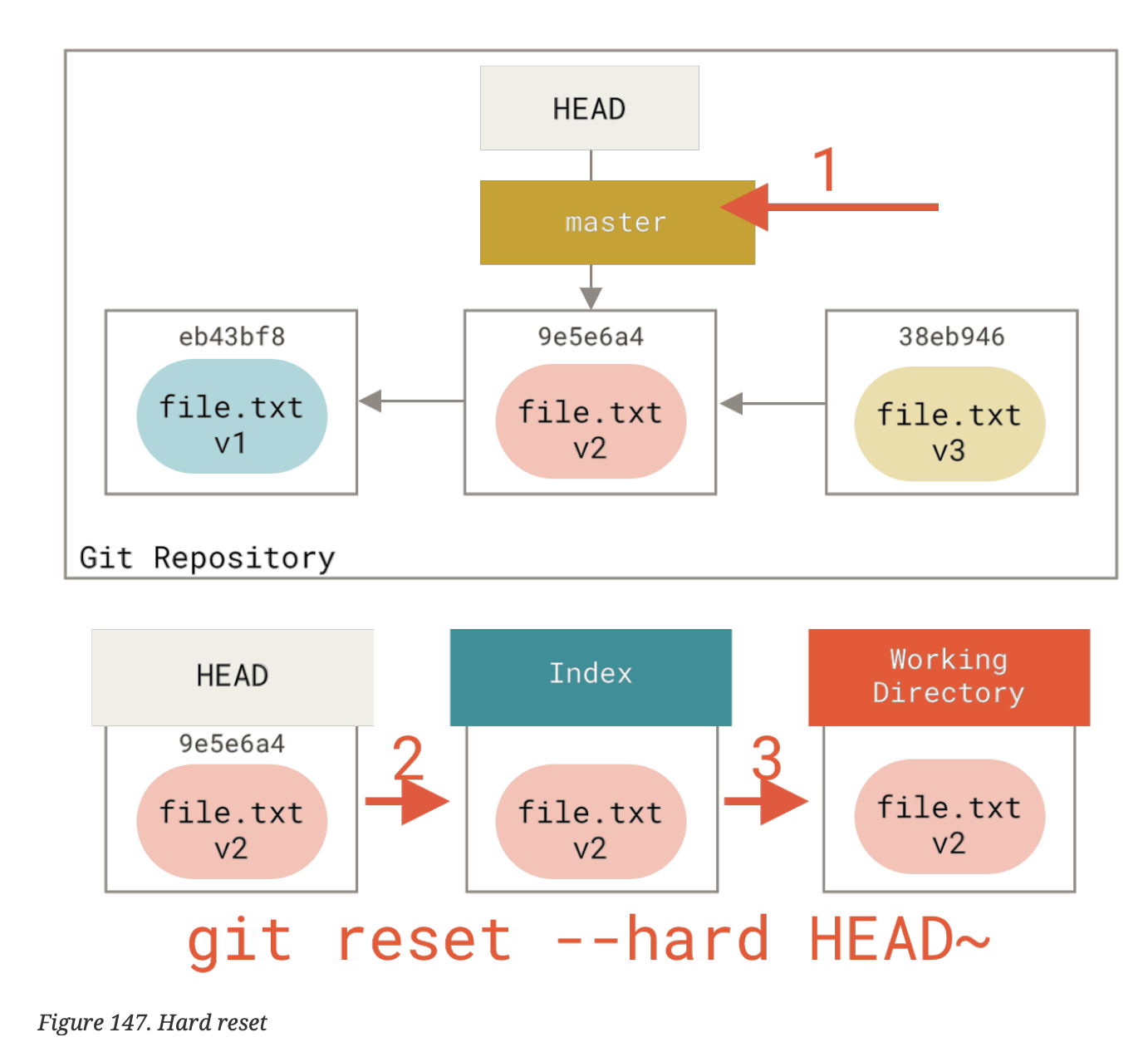
What do the 3 levels of git resetting (--soft, --mixed, --hard) do?
- moves branch that
HEADpoints to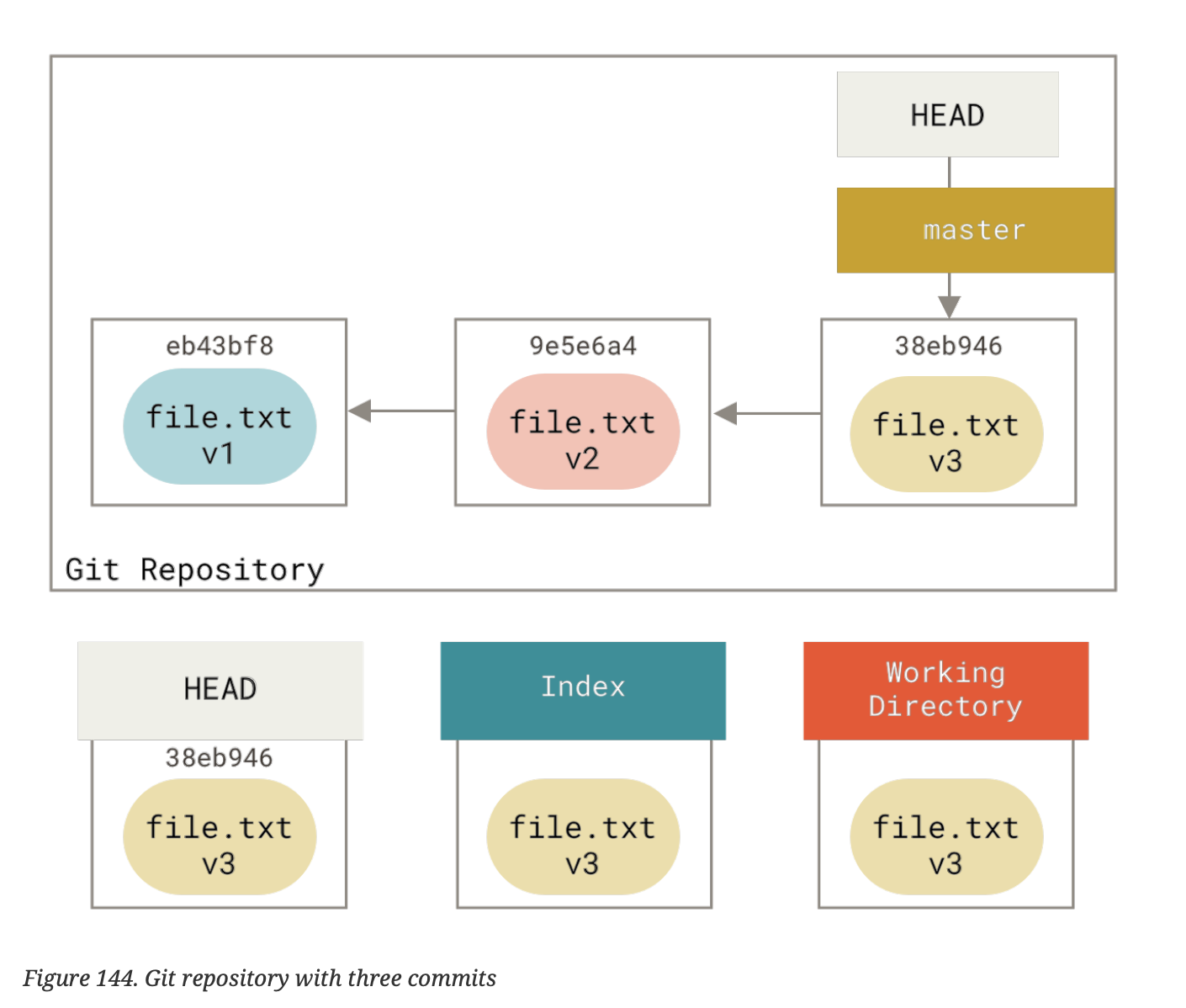
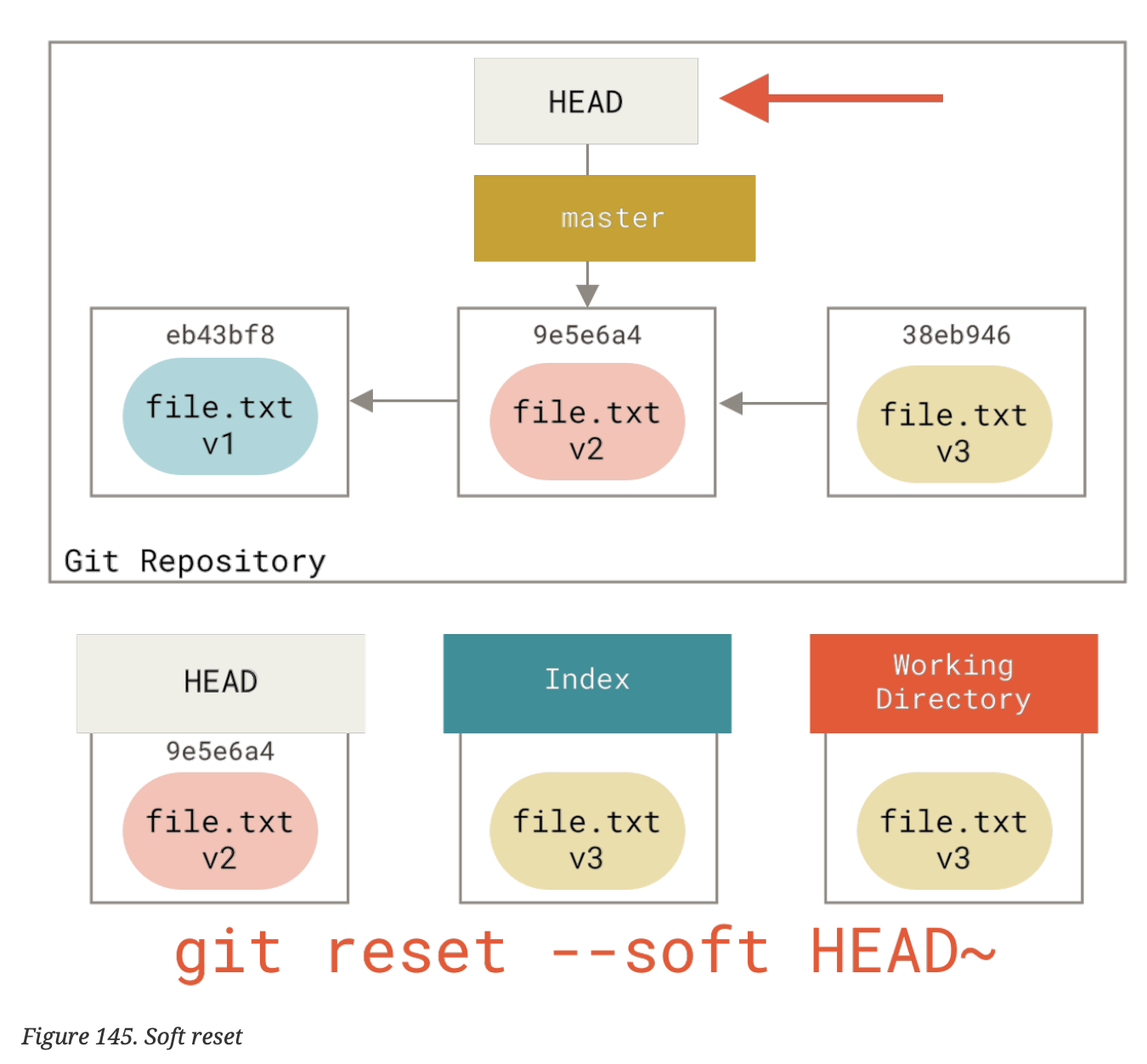
- updates index with contents of new snapshot that
HEADpoints to.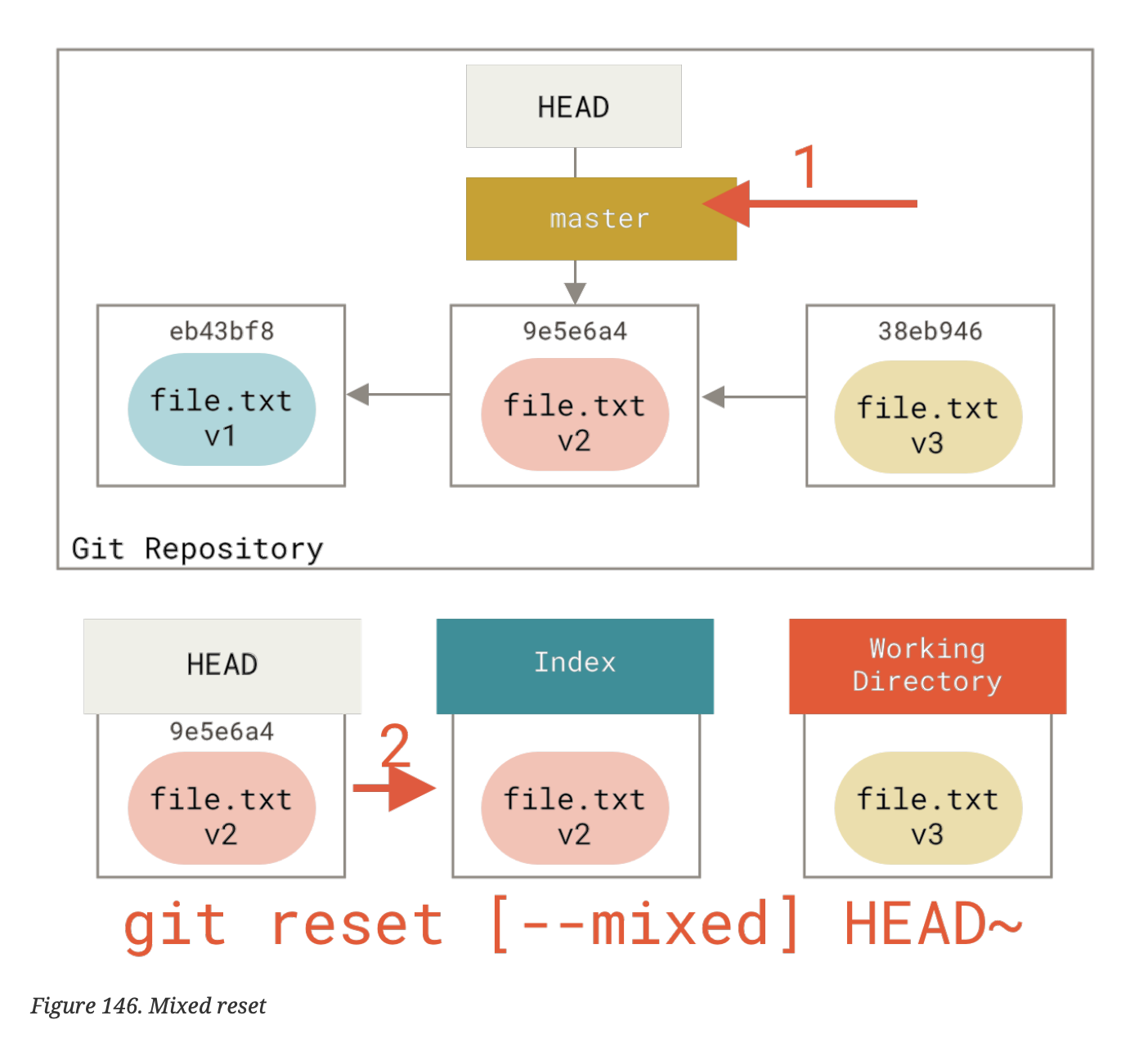
- makes working directory look like index
What does git reset file.txt do? What does this mean practically?
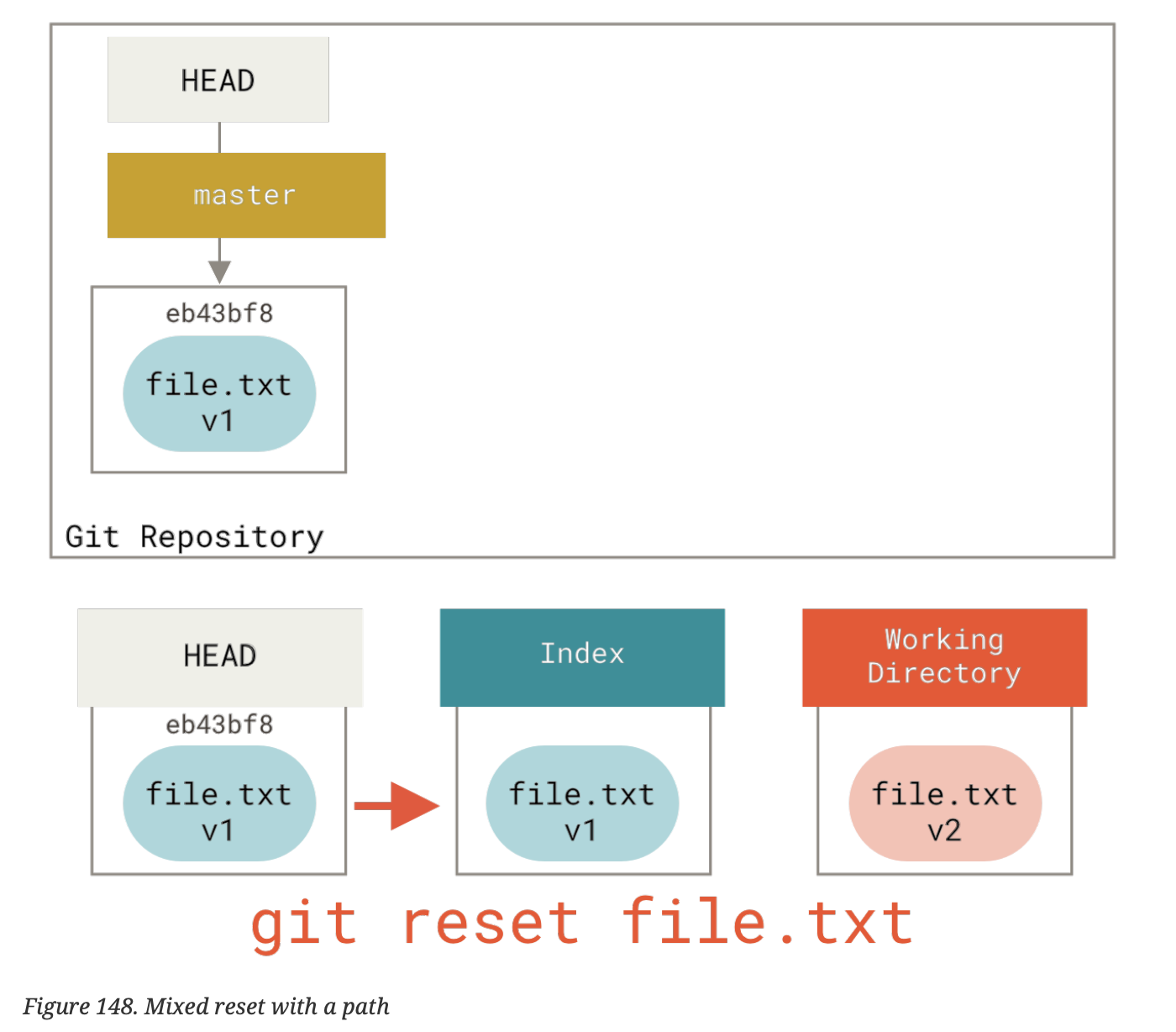
- moving branch that
HEADpoints to is skipped (files are not commits!) - make index look like
HEAD. practically this unstages the file.
How can you squash commits with git reset?
git reset --soft HEAD~2
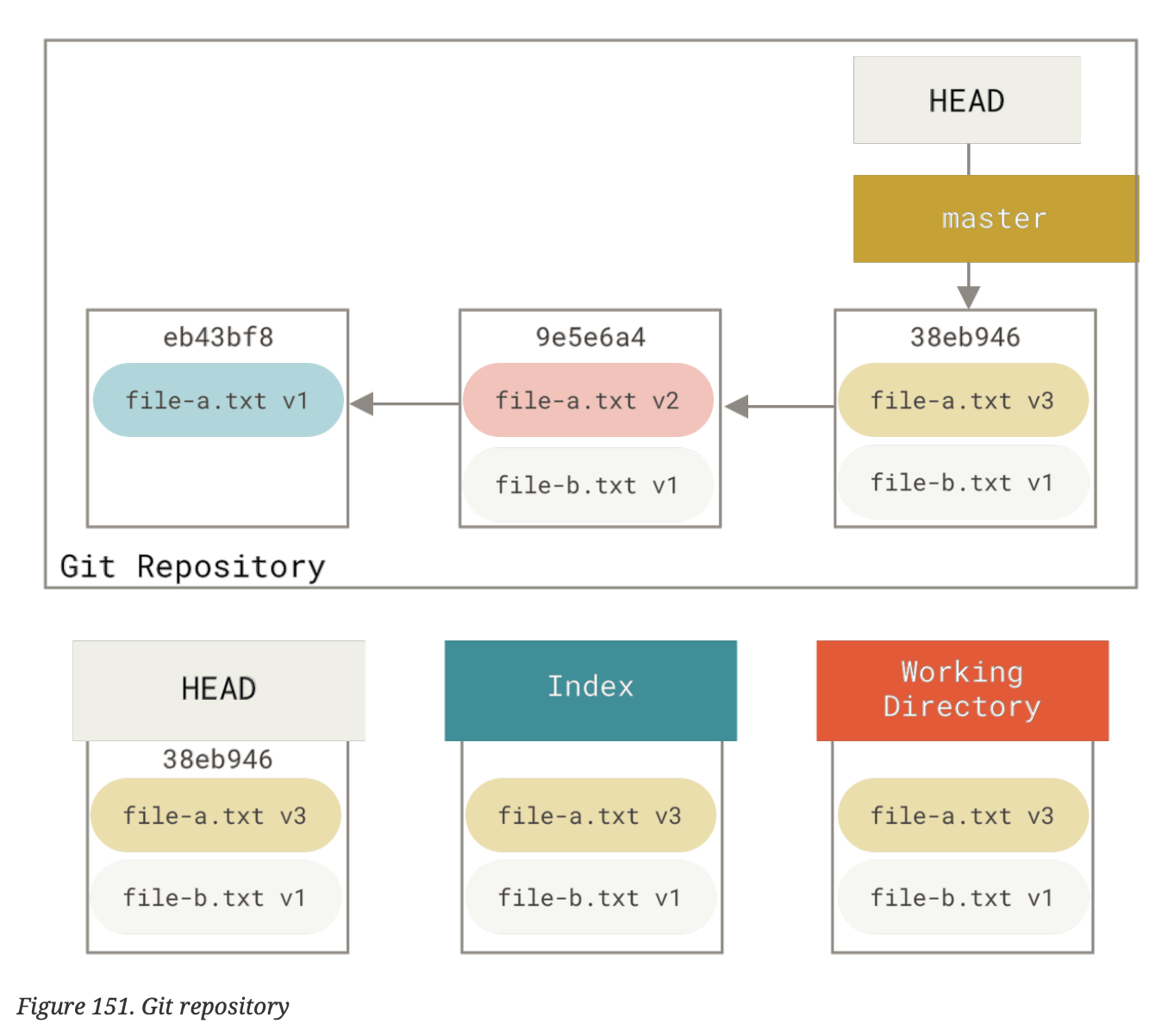
git commit
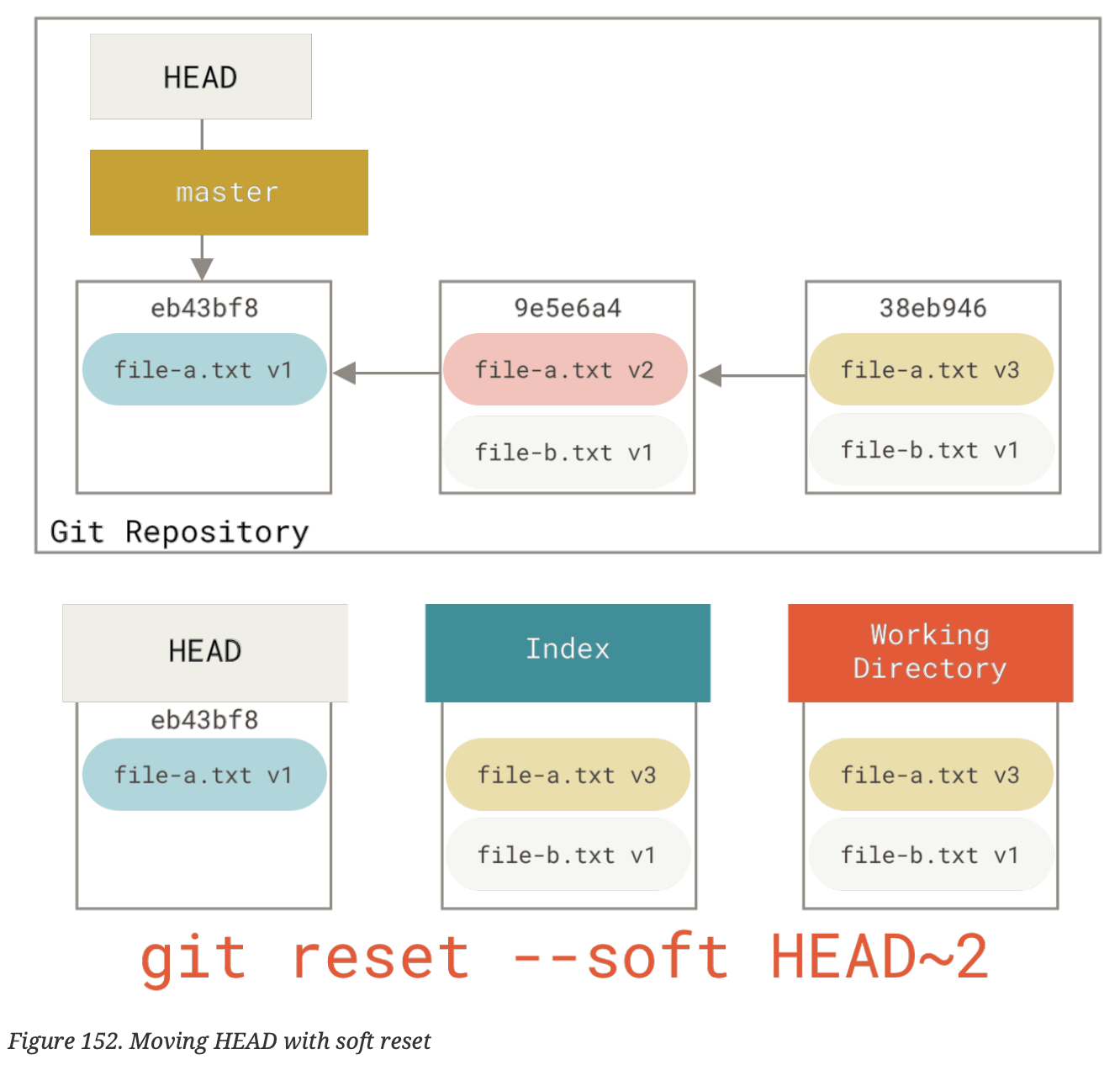
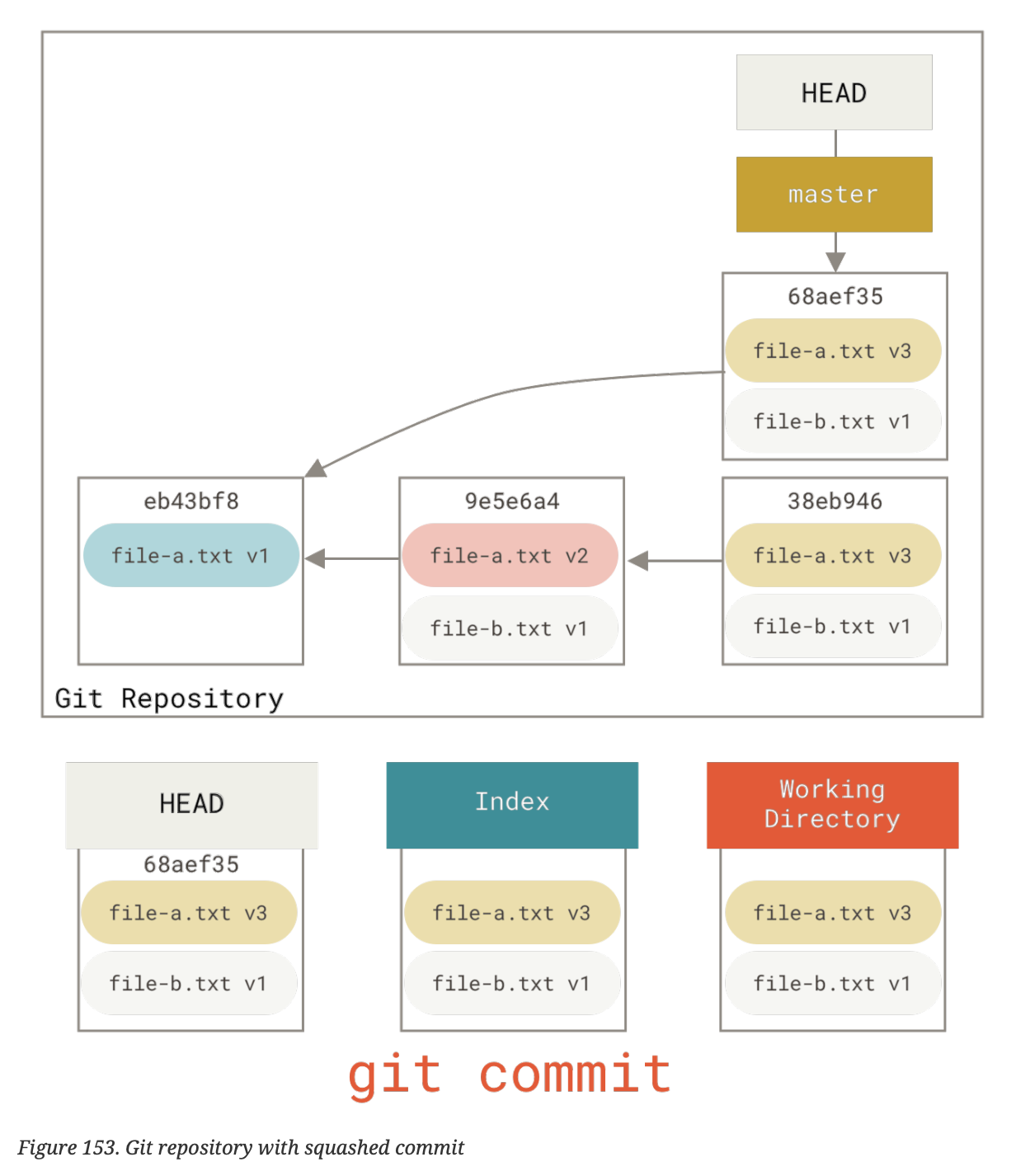
Whilst reset will move the {{c1::branch}} that HEAD points to, checkout will {{c2::move HEAD itself to point to another branch}}
Text
Whilst reset will move the {{c1::branch}} that HEAD points to, checkout will {{c2::move HEAD itself to point to another branch}}
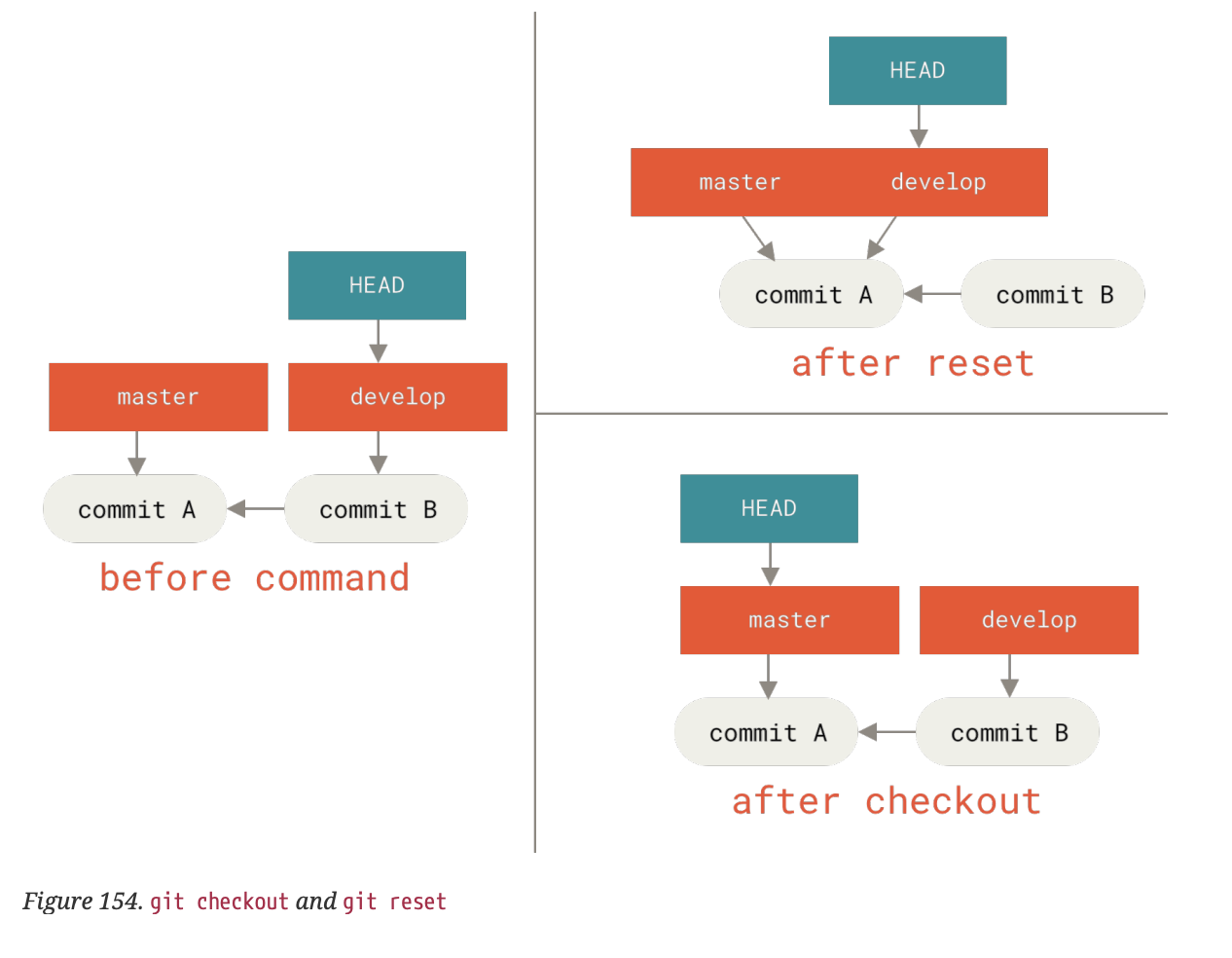
Back Extra
Table
Text
HEAD |
Index | Workdir | WD Safe? | |
|---|---|---|---|---|
| Commit Level | ||||
reset --soft [commit] |
{{c1::REF}} | {{c2::NO}} | {{c3::NO}} | {{c4::YES}} |
reset [commit] |
{{c5::REF}} | {{c6::YES}} | {{c7::NO}} | {{c8::YES}} |
reset --hard [commit] |
{{c9::REF}} | {{c10::YES}} | {{c11::YES}} | {{c12::NO}} |
checkout <commit> |
{{c13::HEAD}} | {{c14::YES}} | {{c15::YES}} | {{c16::YES}} |
| File Level | ||||
reset [commit] <paths> |
{{c17::NO}} | {{c18::YES}} | {{c19::NO}} | {{c20::YES}} |
checkout [commit] <paths> |
{{c21::NO}} | {{c22::YES}} | {{c23::YES}} | {{c24::NO}} |
How do you back out of a merge when you weren't expecting conflicts?
git merge --abort
What does git reset --hard =HEAD= do?
reverts the repository back to the last committed state
What options can be used to merge when the only differences between the code is whitespace?
git merge -Xignore-space-change <branch>
or instead use the flag -Xignore-all-space
What is the difference between -Xignore-all-space and -Xignore-space-change?
"all-space" ignores whitespace completely when comparing lines, "space-change" treats sequences of one or more whitespace characters as equivalent
When you get into a merge-conflict state, how can you export the files from the common state, their state and your state?
$ git show :1:hello.rb > hello.common.rb
$ git show :2:hello.rb > hello.ours.rb
$ git show :3:hello.rb > hello.theirs.rb
What does git ls-files -u do when in a merge conflict state?
$ git ls-files -u
100755 ac51efdc3df4f4fd328d1a02ad05331d8e2c9111 1 hello.rb
100755 36c06c8752c78d2aff89571132f3bf7841a7b5c3 2 hello.rb
100755 e85207e04dfdd5eb0a1e9febbc67fd837c44a1cd 3 hello.rb
shows the conflicting files with
- common ancestor
- yours
- theirs
What does git diff --ours do? What about the --theirs flag? What's the last flag in this vein? git diff --base
--ourss shows what the merge introduced.
--theirs shows us how the merge differed on their side
--base shows how the file was changed on both sides.
What does git checkout --conflict <file> do?
What are the options available to conflict?
Back
diff3 or merge (default)
diff3 will show base markers on <file>. this command resets the markers on a git conflicted file.
How can we get a full list of the unique commits that were included in either branch involved in the merge?
triple-dot syntax:
git log --oneline --left-right HEAD...MERGE_HEAD
How to only see those commits that affect files that are merge-conflicted?
git log --merge
usefully, you probably do want to add --oneline and --left-right
Whan you run git diff while in a conflicted merge state, you only get …
what is currently in a conflicted state.
Note: this can be helpful to see what needs to be resolved.
What are the three steps that reset --hard goes through?
- move the branch that
HEADpoints to - make index look like
HEAD - make the working directory look like the index.
What does git revert do?
makes a new commit which undoes all the changes from an existing one.
What do the -Xours and -Xtheirs flags do?
allow us to choose which files to use in merge conflicts.
What is the flag to provide a merge strategy for git merge?
-s; can take recursive (default) or ours as options. potentially others are available too.
What does rerere stand for?
"re-use recorderd resolution"
What does the -L flag do in git blame?
restricts the lines of the <file> in question
What does the -C option do in git blame?
tries to track down where (else) (in the codebase) the lines in the current file originated from
What does git bisect do?
helps us find the commit that is broken with a binary search
How does git bisect work?
start with git bisect start, then follow it up with git bisect bad.
this will tell it we are in a broken state.
then git bisect good <commit> where <commit> is the commit that is working.
repeat this good, bad cycle until git finds the offending commit.
run git bisect reset when done. this resets HEAD.
How to initialise submodules after a git clone?
Can we do it from the git clone command directly?
Back
git submodule init followed by git submodule update
or indeed: git clone <repo> --recurse-submodules
How can you combine the git submodule init and git submodule update commands?
git submodule update --init,
but for good measure you should really also add the --recursive flag, in case those submodules have submodules too:
i.e. git submodule update --init --recursive
How to see what has changed in a submodule from the present repo?
git diff --submodule
What does git submodule update --remote do?
goes into all the submodules and basically runs git fetch followed by git merge
How can we modify git push to only succeed if all submodule changes have already been pushed?
git push --recurse-submodules=check
Note: --recurse-submodules=on-demand will try to do the git push for you in all submodules.
What does git submodule foreach do?
How can we use it to create a unified diff?
Back
git diff; git submdoule foreach 'git diff'
What do you need to additionally do when checking out a branch with submodules / going to a branch without submodules?
add the recurse-submodules flag to git checkout
This (after git version > 2.13) takes care of placing the submodules in the right state for the branch we're on.
How can you convert a subdirectory into a submodule?
What is wrong with simply doing rm -f <subfolder>; git submodule add ...subfolder.git?
Back
we need to unstage the directory from git's index first!
git rm -r <subfolder> will work
What does git rebase --onto c1 c2 do?=
Rebases the current branch onto c1, starting from commits after c2.
In other words: take all commits reachable from HEAD but not from c2, and replay them onto c1.
This is useful for moving a branch to a new base while excluding certain commits.
What does git bundle create repo.bundle HEAD master do?
creates a local file that contains the entire repo. you must add all the refs desired. it can later be unpacked with git clone repo.bundle repo as usual!
Footnotes
note that the formatting of these cards is not guaranteed; they are the source files for my anki-editor workflow.