Really the github repository is self-documenting.
Here are couple of SVG’s though:

uppercase Computer Modern Omega

uppercase Bold Computer Modern Omega
Really the github repository is self-documenting.
Here are couple of SVG’s though:
uppercase Computer Modern Omega
uppercase Bold Computer Modern Omega
I have had a request from Andre Compadre to produce an F for his site frizzande.io.

thick
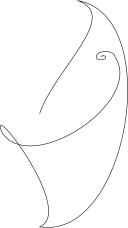
thin
\begin{tikzpicture}[line width=3pt,xscale=0.7,yscale=0.7,line cap=round, line join=round]
\coordinate (a) at (0,4);
\coordinate (z) at (3.7,6);
\coordinate (b) at (2.5,6);
\coordinate (c) at (3,0);
\coordinate (d) at (1,2.5);
\coordinate (e) at (5,4.25);
\coordinate (f) at (4.5,4.25);
\coordinate (g) at (4.75,4.25);
\coordinate (h) at (4.625,4.25);

\draw (a) parabola (z);
\draw (z) to[out=68, in=74] (b);
\draw[bend left] (b) to[out=-30, in=-90] (c);
\draw[bend left] (c) to[out=-120, in=0] (d) to[out=-90, in=-90] (e);
\draw (e) to[out=90,in=90] (f) to[out=-90, in=-90] (g) to[out=90,in=90] (h);
\end{tikzpicture}
\begin{tikzpicture}[line cap=round, line join=round]
\coordinate (a) at (2,3);
\coordinate (b) at (3,6);
\coordinate (c) at (2,0);
\coordinate (d) at (1,2.5);
\coordinate (e) at (4,4.5);
\coordinate (f) at (3.5,4.5);
\coordinate (g) at (3.75,4.5);
\coordinate (h) at (3.625,4.5);

\draw[bend right] (a) to[out=0, in=-90] (b) to[out=90, in=90] (c);
\draw[bend right] (c) to[out=-90, in=0] (d) to[out=-90, in=-90] (e);
\draw (e) to[out=90,in=90] (f) to[out=-90, in=-90] (g) to[out=90,in=90] (h);
\end{tikzpicture}
\begin{tikzpicture}[line width=3pt,xscale=0.7,yscale=0.7,line cap=round, line join=round]

\coordinate (o) at (0,0);
\coordinate (a) at (2,6);
\coordinate (b) at (-2,-6);
\coordinate (c) at (-2,1);
\coordinate (d) at (3,-1);
\coordinate (e) at (2,-2);
\coordinate (f) at (4,-2);
\coordinate (z) at (2,-1);

\draw[bend right] (o) to (a);
\draw (a) to (b);
\draw[bend right] (b) to (o);
\draw (o) ++(-1.3,0.66) circle [x radius=1.5cm, y radius=0.66cm, rotate=-30];
%\draw[bend right] (o) to (c) to (o);
\draw[bend left] (o) to (d) ++(-0.05,0);
%\draw[bend left] (d) to (e) to (d);
\draw (d) ++(-0.4,-0.15) circle [x radius=0.35cm, y radius=0.45cm, rotate=20];
\draw[bend right] (d) to (f);


\end{tikzpicture}

thick
“Sometimes science is more art than science, Morty. A lot of people don’t get that.”
— Rick Sanchez, “Anatomy Park” (Rick and Morty, Season 1, Episode 3)
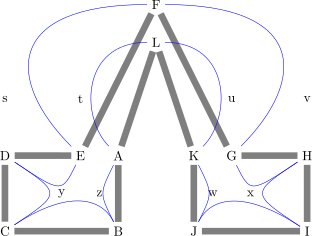





\begin{tikzpicture}
  \node (a) at (3,3) {A};
  \node (b) at (3,1) {B};
  \node (c) at (0,1) {C};
  \node (d) at (0,3) {D};
  \node (e) at (2,3) {E};
  \node (f) at (4,7) {F};
  \node (g) at (6,3) {G};
  \node (h) at (8,3) {H};
  \node (i) at (8,1) {I};
  \node (j) at (5,1) {J};
  \node (k) at (5,3) {K};
  \node (l) at (4,6) {L};
  \node (z) at (2.5,2) {z};
  \node (y) at (1.5,2) {y};
  \node (x) at (6.5,2) {x};
  \node (w) at (5.5,2) {w};
  \node (v) at (8,4.5) {v};
  \node (u) at (6,4.5) {u};
  \node (t) at (2,4.5) {t};
  \node (s) at (0,4.5) {s};

  % backbone controls
  \draw[line width=5pt, color=gray] (a) -- (b) -- (c) -- (d) -- (e) -- (f)
  -- (g) -- (h) -- (i) -- (j) -- (k) -- (l) -- (a);
  % left leg
  \draw[blue] (a) .. controls (z) .. (b);
  \draw[blue] (b) .. controls (z) and (y) .. (c);
  \draw[blue] (c) .. controls (y) .. (d);
  \draw[blue] (d) .. controls (y) .. (e);
  % top arch
  \draw[blue] (e) .. controls (0,5) and (0,7) .. (f);
    \draw[blue] (g) .. controls (8,5) and (8,7) .. (f);
  %\draw[blue] (k) .. controls ($(u) + (0,1)$) and ($(u) - (0,1)$) .. (l);
  \draw[blue] (k) .. controls (6,4) and (6,6) .. (l);
  \draw[blue] (a) .. controls (2,4) and (2,6) .. (l);
  % right leg
  \draw[blue] (g) .. controls (x) .. (h);
  \draw[blue] (h) .. controls (x) .. (i);
  \draw[blue] (i) .. controls (x) and (w) .. (j);
  \draw[blue] (j) .. controls (w) .. (k);


  %\draw[line width=10pt] (0,0) .. controls (1,1) .. (4,0) .. controls (5,0) and (5,1) .. (4,1);
\end{tikzpicture}


\begin{tikzpicture}
    \draw[fill=blue!20] (-1,0) .. controls (-1,0.555) and (-0.555,1) .. (0,1)
    .. controls (0.555,1) and (1,0.555) .. (1,0) .. controls (1, 1.555) and (0.555, 2) .. (0, 2)
    .. controls (-0.555, 2) and (-1, 1.555) .. (-1, 0) -- cycle;

    \filldraw[gray] (-1,0.555) circle [radius=2pt]
    (-0.555,1) circle [radius=2pt]
    (0.555, 1) circle [radius=2pt]
    (1,0.555) circle [radius=2pt];
\end{tikzpicture}

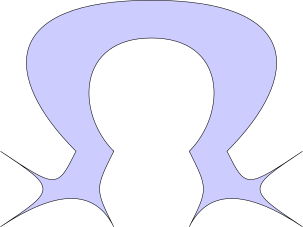
\begin{tikzpicture}
  \coordinate (a) at (3,3) {};
  \coordinate (b) at (3,1) {};
  \coordinate (c) at (0,1) {};
  \coordinate (d) at (0,3) {};
  \coordinate (e) at (2,3) {};
  \coordinate (f) at (4,7) {};
  \coordinate (g) at (6,3) {};
  \coordinate (h) at (8,3) {};
  \coordinate (i) at (8,1) {};
  \coordinate (j) at (5,1) {};
  \coordinate (k) at (5,3) {};
  \coordinate (l) at (4,6) {};
  \coordinate (z) at (2.5,2) {};
  \coordinate (y) at (1.5,2) {};
  \coordinate (x) at (6.5,2) {};
  \coordinate (w) at (5.5,2) {};
  \coordinate (v) at (8,4.5) {};
  \coordinate (u) at (6,4.5) {};
  \coordinate (t) at (2,4.5) {};
  \coordinate (s) at (0,4.5) {};

  \draw[fill=blue!20] (a) .. controls (z) .. (b)
  .. controls (z) and (y) .. (c)
  .. controls (y) .. (d)
  .. controls (y) .. (e)
  .. controls (0,5) and (0,7) .. (f)
  .. controls (8,7) and (8,5) .. (g)
  .. controls (x) .. (h)
  .. controls (x) .. (i)
  .. controls (x) and (w) .. (j)
  .. controls (w) .. (k)
  .. controls (6,4) and (6,6) .. (l)
  .. controls (2,6) and (2,4) .. (a) -- cycle;
\end{tikzpicture}


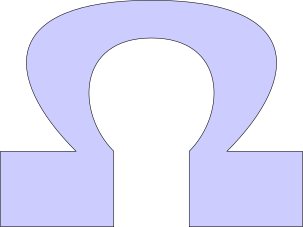
\begin{tikzpicture}[relative=false]
  \coordinate (a) at (3,3) {};
  \coordinate (b) at (3,1) {};
  \coordinate (c) at (0,1) {};
  \coordinate (d) at (0,3) {};
  \coordinate (e) at (2,3) {};
  \coordinate (f) at (4,7) {};
  \coordinate (g) at (6,3) {};
  \coordinate (h) at (8,3) {};
  \coordinate (i) at (8,1) {};
  \coordinate (j) at (5,1) {};
  \coordinate (k) at (5,3) {};
  \coordinate (l) at (4,6) {};
  \coordinate (z) at (2.5,2) {};
  \coordinate (y) at (1.5,2) {};
  \coordinate (x) at (6.5,2) {};
  \coordinate (w) at (5.5,2) {};
  \coordinate (v) at (8,4.5) {};
  \coordinate (u) at (6,4.5) {};
  \coordinate (t) at (2,4.5) {};
  \coordinate (s) at (0,4.5) {};

  \draw[fill=blue!20] (a) to[out=270,in=90] (b)
  to[out=180,in=0] (c)
  to[out=90,in=270] (d)
  to[out=0,in=180] (e)
  .. controls (0,5) and (0,7) .. (f)
  .. controls (8,7) and (8,5) .. (g)
  to[out=0,in=180] (h)
  to[out=270,in=90] (i)
  to[out=180,in=0] (j)
  to[out=90, in=270] (k)
  .. controls (6,4) and (6,6) .. (l)
  .. controls (2,6) and (2,4) .. (a) -- cycle;
\end{tikzpicture}

\begin{tikzpicture}[out=180,in=135]
\draw (0,0) to (1,0)
to (2,1)
to (2,2);
\end{tikzpicture}


\begin{tikzpicture}[line width=3pt,xscale=0.7,yscale=0.7,line cap=round, line join=round]
  \draw[fill=red] (-0.1, 0) coordinate (a) arc [start angle=-60, end angle=240,
  x radius=0.75cm, y radius=0.66cm] coordinate (b);
  \draw (0.66, 0) coordinate (c) arc [start angle=-30, end angle=210,
  x radius=1.3cm, y radius=1cm] coordinate (d);
  \draw (c) to[out=0,in=225] ++(0.66,0) to[out=-105,in=105] ++(0,-0.66) to[out=165,in=15] ++(-1.5,0.1) to[out=75,in=-75] (a);
  \draw (d) to[out=180,in=-45] ++(-0.66,0) to[out=-75,in=75] ++(0,-0.66) to[out=15,in=165] ++(1.5,0.1) to[out=105,  in=-105] (b);

\end{tikzpicture}

\begin{tikzpicture}[line width=3pt,xscale=0.7,yscale=0.7,line cap=round, line join=round]
  \draw[fill=purple] (-0.1, 0) coordinate (a) arc [start angle=-60, end angle=240,
  x radius=0.75cm, y radius=0.66cm] coordinate (b) (0.66, 0) coordinate (c) arc [start angle=-30, end angle=210,
  x radius=1.3cm, y radius=1cm] coordinate (d) (c) to[out=0,in=225] ++(0.66,0) to[out=-105,in=105] ++(0,-0.66) to[out=165,in=15] ++(-1.5,0.1) to[out=75,in=-75] (a) (d) to[out=180,in=-45] ++(-0.66,0) to[out=-75,in=75] ++(0,-0.66) to[out=15,in=165] ++(1.5,0.1) to[out=105,  in=-105] (b);

\end{tikzpicture}


\begin{tikzpicture}
  % Use even odd rule to fill the outer arc minus the inner arc
  \path[fill=gray!30, even odd rule]
    % --- Outer arc (big ellipse) ---
    (0.66, 0) arc [
      start angle=-30, end angle=210,
      x radius=2cm, y radius=1.33cm
    ]
    -- cycle
    % --- Inner arc (smaller ellipse) ---
    (0, 0) arc [
      start angle=-45, end angle=225,
      x radius=1.5cm, y radius=1cm
    ]
    -- cycle;
\end{tikzpicture}


\begin{tikzpicture}[line width=3pt,xscale=0.6,yscale=0.7,line cap=round, line join=round]
\definecolor{bostonuniversityred}{rgb}{0.8, 0.0, 0.0}
  \coordinate (c) at (0.66,0);

  \path[
    fill=bostonuniversityred,            % Fill the interior in red
    draw=black]

    (c)
      arc [
        start angle=-30, end angle=210,
        x radius=1.3cm, y radius=1cm
      ] coordinate (d)

      to[out=180, in=-45] ++(-0.66,0)
      to[out=-75, in=75]  ++(0,-0.66)
      to[out=15,  in=165] ++(1.5,0.1)
      to[out=105, in=-105] coordinate (b) ++(0,0.5)

      arc [
        start angle=240, end angle=-60,
        x radius=0.75cm, y radius=0.66cm
      ] coordinate (a)

      to[out=-75,in=75] ++(0,-0.6)
      to[out=15, in=165] ++(1.33,0.1)
      to[out=105, in=-105] ++(0,0.66)
      to[out=225, in=0] (c) -- cycle;

\end{tikzpicture}